 Memento
Numbers & calculations
A forecast, a budget, a capacity plan — the numbers that follow from each other. You write down what you assumed and how the figures relate; Memento does the arithmetic, every time the page is read.
Why not just type the numbers
Because typed numbers go stale the moment an assumption changes, and nothing on the page tells you which of them somebody chose and which were worked out. Move one hire from January to March and eleven other figures are quietly wrong.
A calculation keeps the model instead of the answers. Change hires from 2 to 3 and every month recomputes — no waiting for the agent, and no chance the arithmetic drifted from what you wrote above it.
Adding one
Open a page, hit Edit, and on a new line type / → Advanced → Calculation. You get an empty block with the syntax shown in grey — start typing and the hints disappear. Or just ask the assistant for the thing you want costed; it writes calculations rather than doing sums in its head.
Writing the model
A calculation is a list of names and what they equal:
period: 2026-01 .. 2026-12

hires      = 2
salary     = €45 000
overhead   = €3 500
growth     = 15%

payroll[m] = hires * salary / 12
burn[m]    = payroll[m] + overhead
total      = sum(burn)
runway     = €60 000 / mean(burn)
Everything you need is in those eleven lines:
name = valueis an assumption — a number you chose.name[m] = …is one value per month, and needs theperiod:line to say which months. Refer to the month before with[m-1]; give the first month a starting value likecash[2026-01] = €10 000when you do.- Units look after themselves. Write
€45 000and it is money; write15%and it is a rate; a plain number stays a plain number. Anything worked out from money is money — soburnandtotalcome out in euros without being told, whilerunway, being money divided by money, comes out as a number of months. - Arithmetic and a few functions:
+ - * /, brackets, andsum,mean,min,maxacross a row. - Notes to yourself after a
#, and45 000,45_000and45000are all the same number — group the digits however reads best, including straight from the table above.
What you get
The assumptions appear along the top as boxes you can type in, and everything below is computed. Change a box and the table moves immediately — that is a what-if, not an edit: the page still holds the original figures, and Reset to the page puts them back. To make a new assumption stick, edit the block itself.
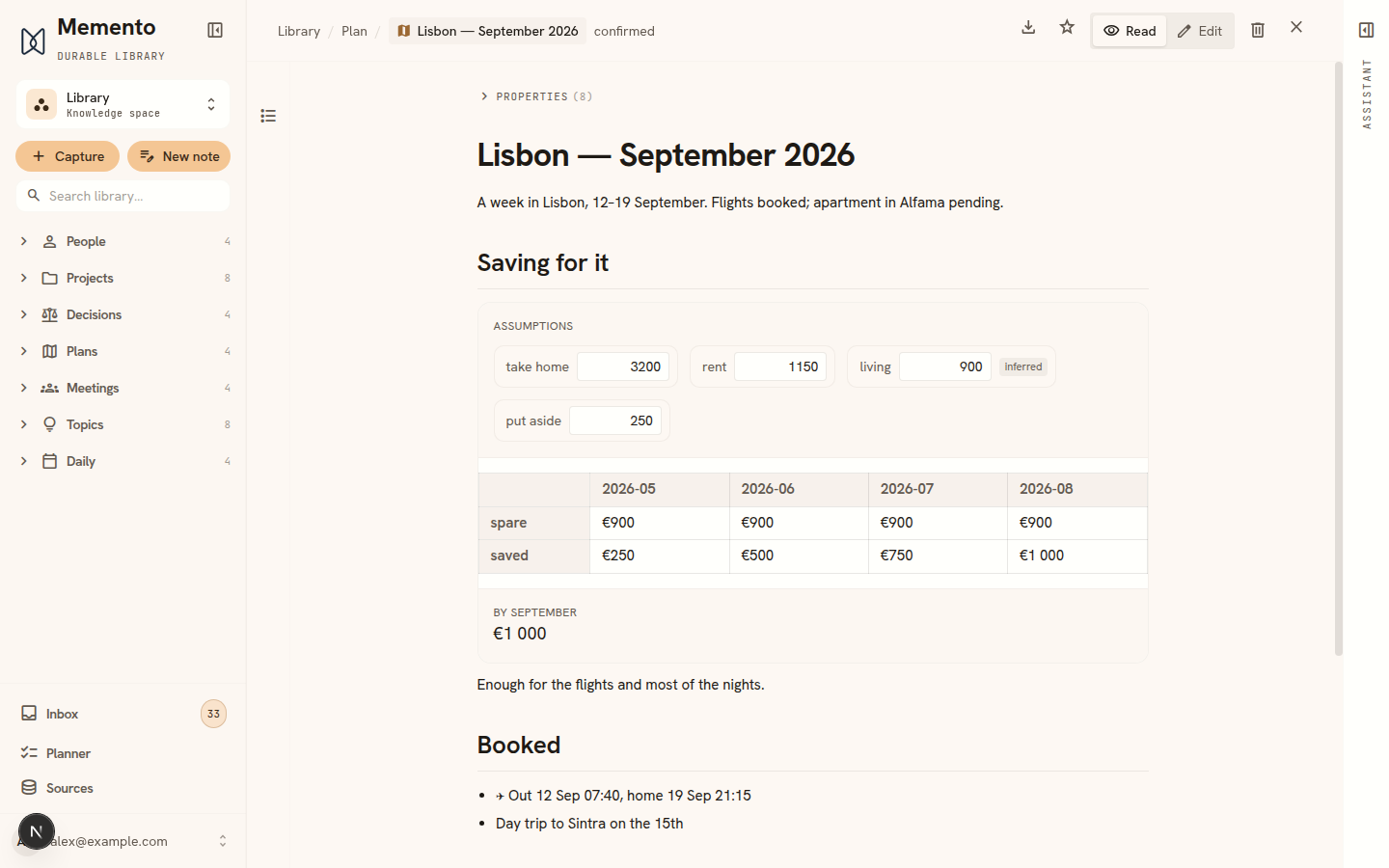
Where the figures came from
Memento’s rule for facts applies to numbers too: a figure is either something you chose or something worked out from it, and the two never blur. Assumptions can cite their source the same way any claim does, and they show a badge saying so — while a computed row needs no citation, because the formula above it is the citation. See Sources & trust.
Only assumptions are editable in the table. A computed figure has no box, because a number you could overwrite by hand would be a table lying about how it reached its own totals.
When something is wrong
A mistake is reported in place, in words — a name you never defined, a division by zero, two lines that depend on each other, a month with nothing to start from. The rest of the table keeps working around it. Nothing ever renders as a nonsense number, because a confident wrong figure in a budget is worse than a visible error.
What it is not
It is not a spreadsheet, and deliberately so. There are no cells, no B7, and no binary file — a calculation is plain text in your page, so it survives export, reads as a model rather than a grid of results, and can be checked without recomputing anything.
That also means a plain list of recorded amounts — three invoices, a price list — is better as an ordinary table. Reach for a calculation when the figures derive from each other.