 Memento
Routines
A routine is a prompt you write once and Memento runs on a schedule — exactly as if you had typed it into the assistant yourself. A morning brief before you sit down, a Friday sweep of your action items: the assistant works while you don't.
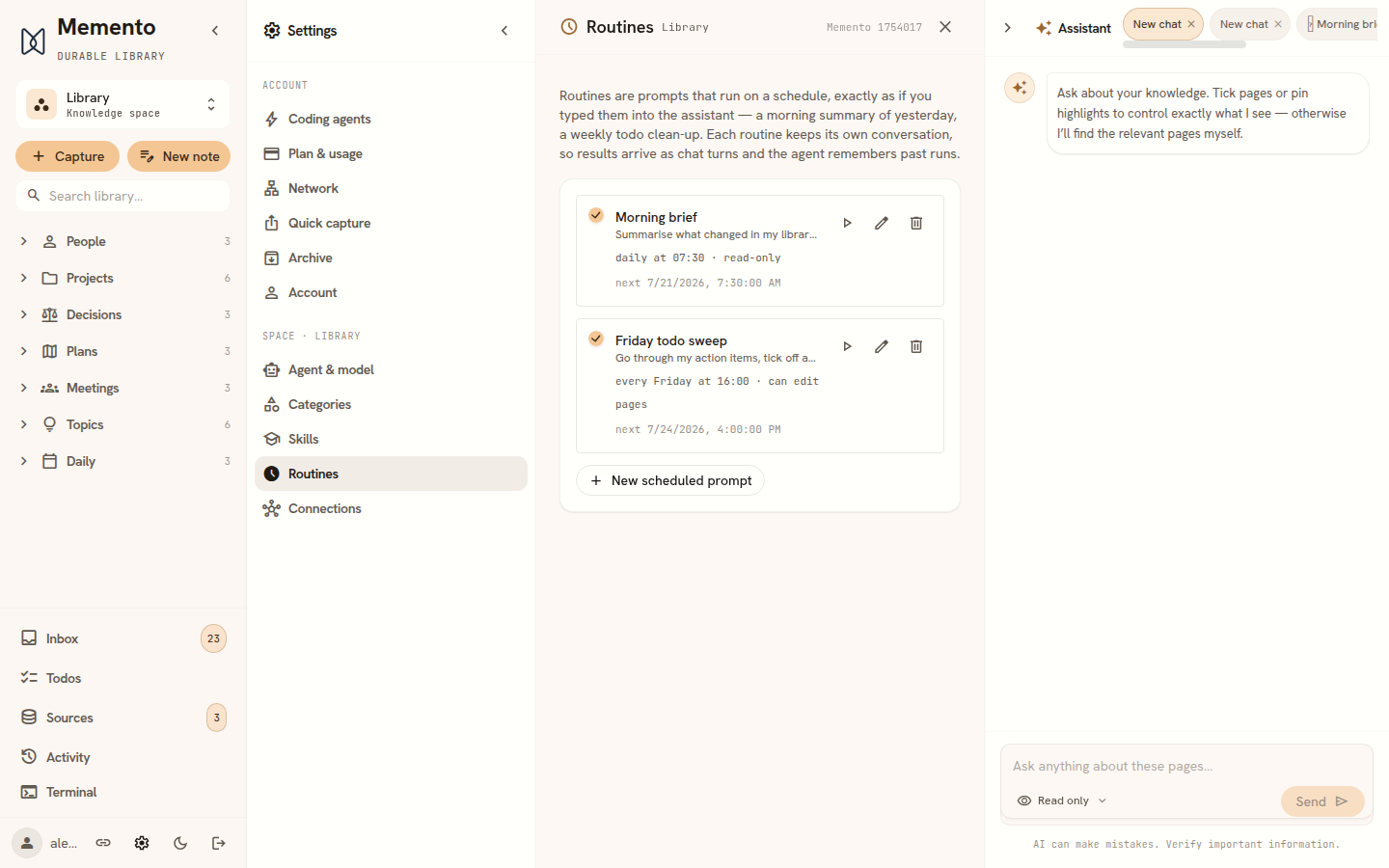
Creating a routine
Open Routines in the sidebar. It shows the routines of the space you are in; switch space first to add one somewhere else. Press New scheduled prompt and write the prompt the way you would say it in chat. Then choose:
- Mode — Read-only answers like an Ask turn and never touches your pages. Edit pages lets the agent act on the library — update task lists, append a log entry — with the same safety net as any edit: additive changes land directly, while anything that rewrites a confirmed fact, merges pages, touches a protected page, or moves content between spaces waits for your review in your Inbox. The full list is on The assistant.
- Schedule — daily, weekdays, or weekly on a chosen day, at a time of day in your timezone. Daylight-saving shifts are handled for you: 07:30 stays 07:30.
- Notify me — Every time, Only when something changed, or Never. See Notifications below.
Run now (the play button) fires a routine immediately — handy to check the prompt does what you meant before trusting it to a 7am slot.
Where results go
Every routine keeps its own conversation in the assistant, marked with a ⏰. Each run adds your prompt and the assistant's answer as ordinary chat turns, so you can scroll back through past mornings — and because it is a real conversation, the agent remembers previous runs: a daily brief knows what it already told you yesterday. View results on the routine jumps straight to its conversation.
Home keeps an eye on them too. Its Routines section shows up to three: a run that failed first, then the latest result, then the next one due. A finished run offers Read result, which opens the routine’s conversation; a failed one offers View details; a scheduled one shows when it runs next. Manage opens the full Routines screen. Routine conversations are kept out of Home’s Recent conversations so they are not listed twice; they are still in the full chat history.
Notifications
At the end of every run the assistant gives a verdict: did it find anything you have not already been told by an earlier run? It answers with something new or nothing new and one line saying what it found — or, when nothing changed, what it last saw, so the next run has something to compare against. What happens next depends on the routine’s Notify me setting:
- Every time — each run notifies you, with that one line. This is the default, and every routine you made before the setting existed works this way.
- Only when something changed — for watching rather than reporting: “tell me if the status of X changes”, “any new papers on Y?”. A run that finds nothing new stays quiet; a run that finds something notifies you with one line saying what changed. If the assistant gives no clear verdict, you are notified anyway — a routine never swallows a result because it could not decide. An edit-mode run whose change is waiting for your review notifies too, since it needs you.
- Never — no notifications at all, not even when a run fails. Check the routine’s conversation, or the Routines screen, when you want to.
Quiet runs still happen and still count as runs: each one adds its answer to the routine's conversation, followed by a short line with the verdict and whether you were notified. On the Routines screen, each routine shows its notify setting and the latest verdict with its one-line summary. A failed run notifies you in both Every time and Only when something changed.
Notifications collect under the bell at the top of the sidebar, read and unread, newest first; on a phone it is Alerts in the bar along the bottom. Opening a routine’s notification — from the list, or from the pop-up that announces it — opens the routine’s conversation, where that run’s answer is.
If you rewrite a routine's prompt, its next run starts fresh: the old verdict described a different question, so it is not used as the baseline.
Good first routines
- “Summarise what changed in my library yesterday and list anything that needs my attention.” — daily, read-only.
- “Go through my action items, tick off anything my notes say is finished, and flag stale ones.” — weekly, edit mode.
- “List open questions across my project pages that nobody has answered yet.” — weekdays, read-only.
- “Check whether my project pages mention a new deadline since you last looked.” — daily, read-only, notify only when something changed.
Pausing a routine (the checkbox) keeps it and its conversation but stops the schedule; deleting it removes only the schedule — the conversation stays in the assistant. Edit-mode runs show up in the Activity ledger like any other agent run; see The assistant for how review and undo work.