 Memento
Capturing
Capture is deliberately dumb: one box, no filing decisions, no friction. Everything smart happens afterwards, in the background.
What you can capture
- Notes and thoughts — type or dictate; ⌘+Enter sends it.
- Links — paste a URL; Memento fetches and reads the page for you.
- Files — PDF, DOCX, PPTX, XLSX, Markdown, TXT, HTML, CSV, and saved emails (EML). Drop them on the capture page.
Duplicates are detected server-side — capturing the same document twice just tells you it's already in your library.
Sequential vs. bulk
Normal capture is sequential: one item at a time, and the agent may ask a clarifying question before filing. When you're importing a backlog — an old notes folder, an export from another tool — use Bulk import: everything is filed in one pass with no questions asked. You can always refine pages later. Bulk import sits in the menu behind the arrow on the Capture button at the top of the sidebar.
Notes you write in place
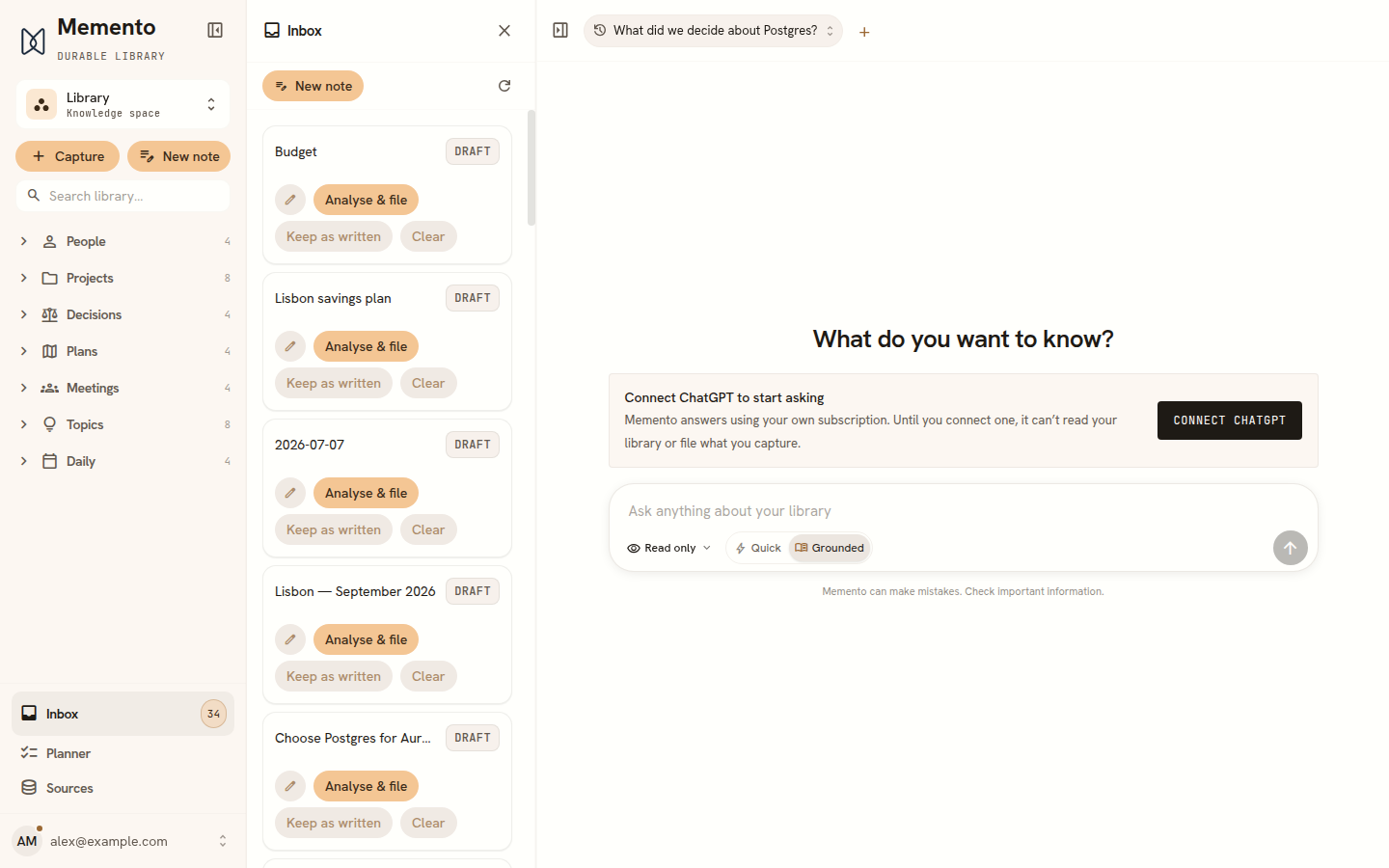
New note, in the same menu on the Capture button, opens a draft right in the editor — good for meeting notes you're typing as they happen. A draft sits in your inbox untouched until you hit Analyse & file; then it goes through the same pipeline as any capture, and your original note is preserved as the source. Keep as written files it word for word instead — the agent only suggests which category it belongs under.
The inbox
The inbox is everything still in play: items waiting to be analysed, items the agent has a question about, and drafts. A filed capture stays visible (marked with where it went) until you clear it, so nothing ever silently disappears.
You reach it from Home. The Needs your input section there shows the first few items waiting on you — drafts, and questions the agent needs answered — with their buttons, so a quick one can be dealt with on the spot. The number on the Home entry in the sidebar is the same count. Open inbox next to the section heading opens the full inbox, including filed captures you haven't cleared yet; it is there even when nothing is waiting. Opening Home or the inbox never marks anything as dealt with.
Click anywhere on an item to open it and read it in the middle of the screen; the buttons on the card (Analyse & file, Clear, and the rest) still do their own thing. The inbox stays open while you read, so working through a pile is one pass rather than reopening the panel for every item.
By email
You also have a personal address to forward mail to — newsletters, receipts, threads, messages with documents attached. Each one lands in your inbox as a capture. See Capture by email.
From your phone
The fastest capture is the one you never open the app for: share any page or selection from another app straight into Memento. See On your phone for one-time setup on iOS and Android.